Silicone Buttons for Drone Gimbal Controllers: Tactile Feedback in Compact Designs
Silicone Buttons for Drone Gimbal Controllers: Tactile Feedback in Compact Designs
A dead button is easy to diagnose. The harder fault is the mode switch that answers with silence: the pill bridges the pads, the firmware registers the press, and the operator still cannot say whether the command took.
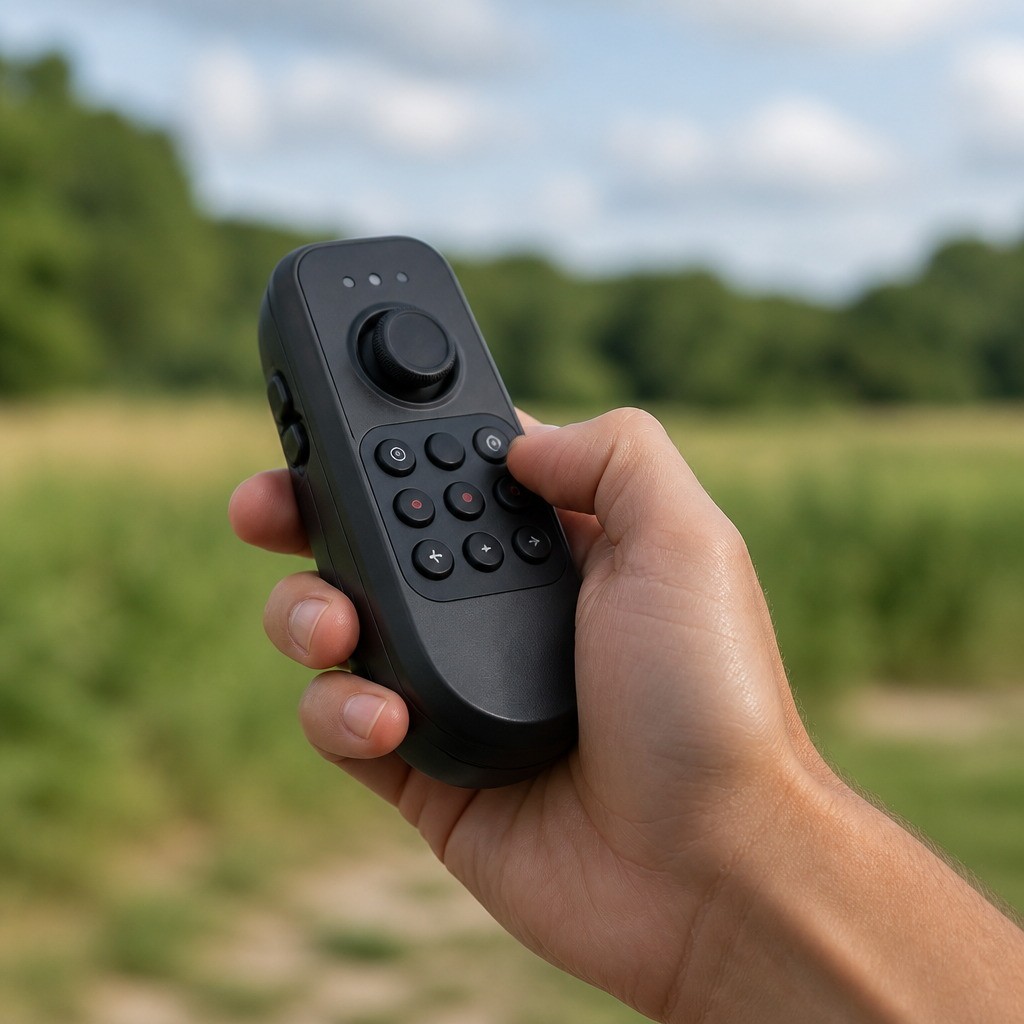
That failure lives in the interface. Silicone Buttons for Drone Gimbal Controllers usually arrive as one molded sheet holding eight to sixteen small caps in a footprint barely larger than a business card, and here the eyes stay on the feed or the horizon while one finger is already committed to the stick. So the keypad has to identify itself and confirm every press by feel.
What Makes Silicone Buttons for Drone Gimbal Controllers Different?
The binding constraint is not the electronics, it is the thumb: the unit is held for long stretches, often one-handed, sometimes with the wrist braced against a monopod.
Five constraints press on the keypad at once:
- Limited installation space. The keypad shares the face with a stick, a display, an antenna and a battery the designer wants large.
- Small button spacing. Centre distances follow from the housing, and they are often tighter than a thumb can separate by feel.
- Frequent repeated operation. Two or three keys take most of the presses; the rest still have to feel distinct.
- Tactile identification. With sight committed elsewhere, geometry has to encode function.
- PCB or FPC integration. The thinner the carrier, the less support sits behind each pad.
Blind operation changes the specification. Where a button can be seen, shape is decoration; where it cannot, shape is data. Each cap has to be findable without a glance, distinguishable without counting rows, and unambiguous once pressed.
Common Tactile Feedback Problems in Compact Silicone Buttons
Four complaints account for most field returns on a small controller keypad, and each is a geometry problem before it becomes an electrical one.
| Symptom the operator reports | Usual root cause | First thing to check |
|---|---|---|
| Wrong key pressed | Caps too similar in shape and force | Cap profile per function |
| Thumb aches after an hour | Force too high for the cap size | Web thickness against cap diameter |
| Sometimes nothing happens | Make point sits too close to full travel | Travel gap and pill-to-pad distance |
| It fires when the hand shifts | Adjacent caps coupled through a shared web | Web isolation and pad sizing |
Buttons Feel Too Similar to Each Other
Identical round caps at identical force turn the keypad into a counting exercise, and an operator who cannot tell the record key from the recenter key by touch will look down or guess.
Differentiation needs no exotic tooling: a raised bar on one cap, a dished centre on another, a flat top against a domed one, or a deliberately heavier press on the function that must not fire by accident. Choose the differences per function and keep them consistent across the sheet, so the thumb learns one map instead of relearning it every session.
Actuation Force Is Too High
Force complaints rarely come from the compound. They come from a cap that was shrunk while its web stayed the same, which leaves the fingertip less area to press on and lands the same spring rate on a smaller patch of skin.
The result is fatigue rather than failure: the operator braces the unit differently or presses with the thumb joint instead of the pad, and input accuracy falls away exactly when fine adjustment matters. Trimming force on paper is easy; the contact still has to close reliably at the low end of the batch distribution.
Insufficient Travel or Weak Return Force
Travel is what the finger reads. With a conductive carbon pill the circuit makes partway down the stroke, and everything below that point is confirmation. Cut the stroke short and the operator gets a bump instead of a press, so the input is never properly recorded.
Return force is the other half. ISO 815-1:2019 defines compression set as the deformation remaining after a compressive load is removed, the material property behind a cap that travels less and recovers more slowly with age. The link between stroke, make point and perceived response is examined in this note on button travel and tactile response.
Accidental Activation Caused by Tight Button Spacing
Tight spacing creates two failure modes. Mechanical: a rolling thumb rests on two caps and the softer web wins. Electrical: pressing one cap pulls its neighbour's web down slightly, and a generous pad on the neighbour closes early.
The remedies are unglamorous: a slot or rib between neighbouring webs, shorter caps so the finger has less purchase to roll, chamfered cap edges, and contact pads sized to the pill rather than to the copper available.
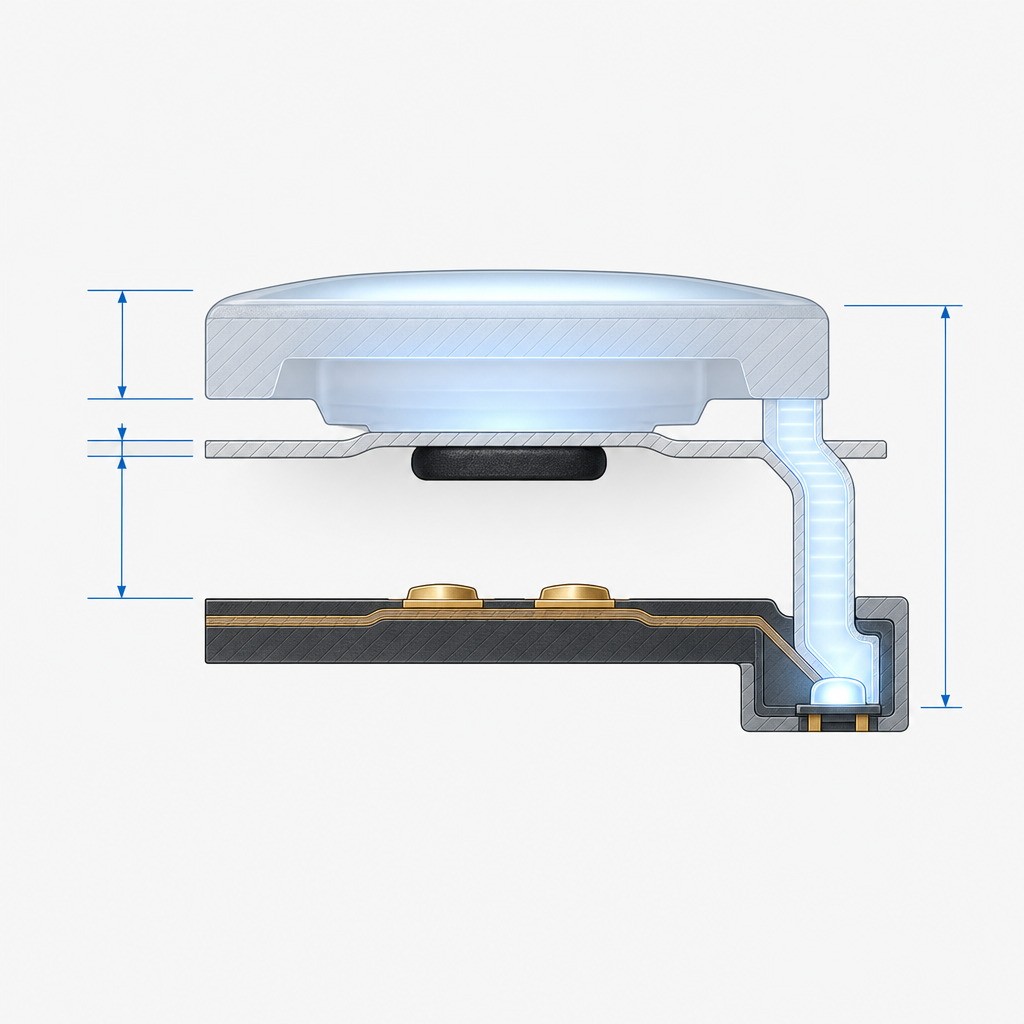
Read the section drawing as a budget. Cap height, web thickness, the gap that defines travel and the distance the pill must close all share one vertical allowance measured in tenths of a millimetre. Fit a thicker battery and the gap absorbs it; add a light guide and it takes some of the same allowance again.
How Silicone Button Geometry Affects Tactile Feedback
Geometry is the part of the interface the molder owns outright, and most field complaints are settled there. Four variables do most of the work on a sheet of Tactile Feedback Silicone Buttons.
Button Diameter and Height
Diameter sets how much of the fingertip touches the cap, how much room the pill and light path get underneath, and how much purchase the finger has to roll onto a neighbour. Height decides how far the cap stands proud of the surface, which is what makes a row findable by feel. Taller caps are easier to locate and easier to knock; wider caps spread the load and eat the spacing, so compact controllers usually settle on a low cap with a pronounced edge.
Flexible Web Design
The web is the spring. Its thickness, unsupported span and the angle at which it meets the cap set both the force needed to collapse it and the length of the stroke it allows. Web stiffness rises steeply with thickness, so a small mold-dimension change moves force far more than the same percentage change in cap diameter.
That steepness is the trap in a Compact Silicone Keypad: softening one stubborn button by 30 percent can take two or three iterations, because the mold is already cut. The same logic governs the dome height tolerance and inconsistent button response seen in enclosed instrument keypads.
Thin webs give a longer, softer stroke but are more sensitive to compression set. Thick webs snap decisively and then refuse to travel.
Button Spacing and Surface Differentiation
Spacing is the housing designer's decision; differentiation is the keypad's answer to it. Where centre distances are tight, shape and surface carry the identification that spacing cannot.
- Cap profile: flat, dished, domed or bar-topped caps are distinguishable the moment the thumb crosses them.
- Force zoning: a heavier press on the function that must not fire by accident, a lighter one on the key used constantly.
- Surface texture: a molded matte finish against a smoother cap, or a laser-etched legend whose edges the finger can feel.
- Grouping: a slight ridge between functional zones.
Integration with PCB or FPC Contacts in a Compact Silicone Keypad
Under the sheet, the contact decides whether any of the tactile work matters. The pill must land on the pad pattern with enough overlap to close the circuit when the cap is pressed off-centre and the sheet has shifted within its locating allowance.
The two carriers behave differently. A rigid PCB supports the pad and holds position, so it tolerates a tighter overlap window. An FPC is thin and flexible: pads need backing behind them, the adhesive must not creep, and folds belong away from the button field. Both appear in Drone Controller Silicone Buttons, and on a thin carrier, which covers most Silicone Rubber Buttons for Remote Controllers, alignment complaints concentrate.
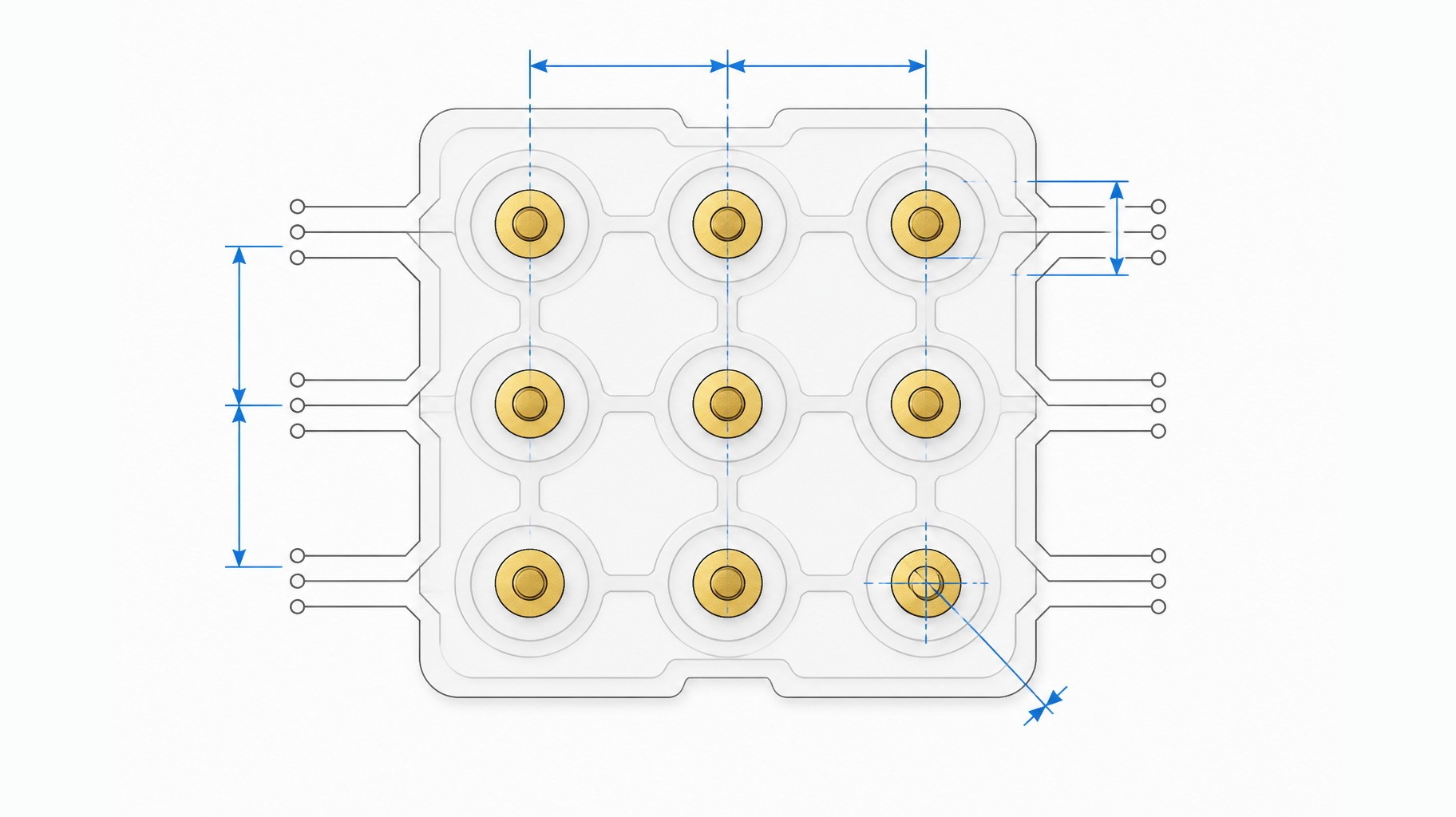
Note the single pad drawn off centre above. In production that error is not cosmetic: it consumes alignment allowance the pill needed and turns a button that had margin into one that depends on a centred press. Board layouts are usually frozen for electrical reasons before the keypad drawing exists, so the rubber absorbs what the copper leaves, the argument set out in this article on keypad integration problems in compact instrument enclosures.
Material and Hardness Considerations for Drone Gimbal Controller Buttons
Compound selection follows geometry rather than the other way round, and the construction of the sheet, from a custom molded silicone rubber keypad through its legends and coating, sets what the compound can do. Hardness, measured by durometer under ISO 48-4:2018, is a point inside a tolerance band rather than an exact number.
Hardness, Recovery and Surface
A softer compound returns the cap more readily and spreads the press over a wider patch of skin, which suits long sessions, but it creeps more under clamp load and is less stable dimensionally in a thin web. A harder compound holds its shape and resists abrasion, yet stiffens every web on the sheet at once, because force and hardness move together unless the web is redrawn.
Recovery decides how the keypad feels after a season of use, and compression set per ISO 815-1:2019 is the usual way to express it. Surface finish matters too: a matte texture hides fingerprints and gives the thumb grip, while a gloss cap shows wear sooner. Damp heat is the quiet aggravator here, and IEC 60068-2-78:2025 describes steady-state damp heat testing, close to what a handheld enclosure meets after a cold morning outdoors.
One caveat: hardness drift between batches is small and normal, but a two or three point shift across a sheet is enough to be felt on the lightest key, and that belongs in a first-article check rather than a promise on a drawing.
Design Challenges When Space Is Limited
Most hard decisions in a compact controller are made by subtraction: every feature added to the housing takes allowance from the keypad.
Balancing Button Size and Housing Space
Cap diameter is not a free variable. Around each cap sits clearance to the bore, a wall that carries the return, and enough skirt to isolate it from neighbours and from any backlight, so shrinking the cap leaves those fixed elements dominating the pitch. A side light guide makes it harder still, because it takes thickness the travel gap would otherwise use.
Preventing Button Interference
Interference is a coupling problem, not a spacing problem. Two caps a few millimetres apart on separate webs behave independently; on one shared web they move together, and pitch does not change that.
Countermeasures are structural: a separate web for every cap, isolating slots where the design can afford them, and a stiffening rib between functional groups.
Maintaining Consistent Tactile Response Across Multiple Buttons
Consistency is measured across every key, not at the centre of the sheet. The cap nearest the clamp line usually feels firmer, and corner keys can differ from edge keys by a margin an operator notices even when a bench press does not.
Gimbal Controller Rubber Buttons also inherit the flatness of the housing, so a cover with a slight bow changes preload key by key and a field that measured uniform in the lab arrives uneven in the assembly.
Allowing Manufacturing Tolerances
This is where compact designs are won or lost. Mold shrinkage, cap height, web thickness, board positional tolerance, housing draft and adhesive thickness each carry a band, and the stack-up must leave a working window in the worst case rather than the nominal one.
Shop-floor reality is unglamorous: a cap that measures correctly near the parting line can sit differently at the far edge of the sheet. Ten good first-article parts show the design is capable, not that the process is centred, the arithmetic behind the 0.1 mm tolerance that decides keypad life.
How to Develop Custom Silicone Buttons for Gimbal Controllers
The order of the steps matters more than the speed of them. Almost every avoidable problem in a Custom Gimbal Controller Keypad comes from a step performed out of sequence, most often geometry before the board layout is fixed.
- Confirm the housing dimensions. Apertures, wall thickness, cover flatness, clamp arrangement.
- Review the PCB or FPC layout. Pad pattern, positional tolerance, pad backing.
- Define button locations. Function map, grouping, available pitch.
- Determine the required actuation force. Per key, lightest and heaviest named.
- Design the silicone geometry. Cap profile, height, web, pill, light path.
- Review prototype samples. Press the field in the housing, not on a bench.
- Evaluate tactile feedback. Identification, make point, return speed, consistency.
- Confirm production tooling. Once the sample field behaves uniformly.
Questions Engineers Should Ask Before Ordering Custom Silicone Buttons
These settle most of the ambiguity before a drawing is released, and each answer changes geometry rather than paperwork.
- Is the controller using a rigid PCB or an FPC, and what sits behind the pads?
- How much installation space remains after the display, stick and battery?
- What force is needed on the lightest and heaviest key, and which way does the band run?
- Are the buttons illuminated, and does a light guide share the travel gap?
- Is printing or laser etching required, and will it survive glove abrasion?
- Do functions need different cap shapes or force zones to be identifiable by touch?
- What operating cycle, temperature and humidity range are expected?
Any enclosure claiming ingress protection is classified under IEC 60529, so the seal around the keypad aperture belongs in the same conversation as the force budget.
Conclusion
Compact drone gimbal controller buttons work when four decisions are made together: silicone material and hardness, cap and web geometry, PCB or FPC contact layout, and the housing structure that clamps them. Treated separately, each choice looks reasonable while the assembled controller feels wrong.
For the Silicone Buttons for Drone Gimbal Controllers discussed here, the test fits in two minutes: press every key in the housing, in the dark, and see whether the thumb can name the function and confirm the press without looking.
These interface decisions are the everyday work of a keypad supplier rather than a controller maker. FromRubber, the brand of Dongguan Bohao Electronic Technology Co., Ltd., has molded custom silicone and plastic parts since 2010 and develops keypads from drawings, samples or sketches.
FAQ: Compact Gimbal Controller Keypad Questions
Why is tactile feedback important in drone gimbal controller buttons?
Because the operator is looking elsewhere. With the eyes on a feed or a subject, the keypad reports two things on its own: which function is under the thumb, and whether the press registered. A button that cannot do both forces a glance downward.
Can silicone buttons be customized for compact controllers?
Yes, and compact housings usually need it. Cap diameter, height and profile, web thickness, force per key, pill size and light path are all mold variables that can be set per function. The pitch is the one thing a designer cannot change once the housing is fixed.
What silicone hardness is suitable for small electronic buttons?
No single figure fits every small keypad. A softer compound returns caps more readily and suits long sessions; a harder one holds its shape and resists abrasion but stiffens every web on the sheet. Force depends on web geometry as well as hardness, so the two are chosen together.
How can accidental activation be reduced in compact button layouts?
Isolate the webs so a press cannot pull a neighbour down, keep cap heights low enough that a rolling thumb cannot lever onto the next key, and size contact pads to the pill rather than to the space available. A deliberate force difference between a risky function and its neighbours helps as well.
Can silicone buttons work with FPC circuits?
They are used with FPCs in thin handheld products, but the flexible carrier needs support. Pads should have backing behind them, the adhesive has to hold position over time, and folds belong away from the button field. Alignment tolerance is looser than on a rigid board, so the pill overlap allowance has to be larger.
Sources and standards referenced
- ISO 48-4:2018 Rubber, vulcanized or thermoplastic, determination of indentation hardness by durometer method (Shore hardness): https://www.iso.org/standard/74969.html
- ISO 815-1:2019 Rubber, vulcanized or thermoplastic, determination of compression set: https://www.iso.org/standard/74943.html
- IEC 60068-2-78:2025 Environmental testing, Test Cab: Damp heat, steady state: https://webstore.iec.ch/en/publication/82357
- IEC 60529 Degrees of protection provided by enclosures (IP Code): https://webstore.iec.ch/en/publication/2452