How to design the flexing web of keypad
Keypad mechanics / web geometry - reviewed 11 November 2026
Flexing web design is where a silicone keypad becomes a mechanism. The web is a thin membrane around each key that stretches, buckles and returns; its thickness, its profile and the clearance around it set the force, the travel and the life of the panel. Get the web right and the key feels inevitable. Get it wrong and no change of compound rescues it.
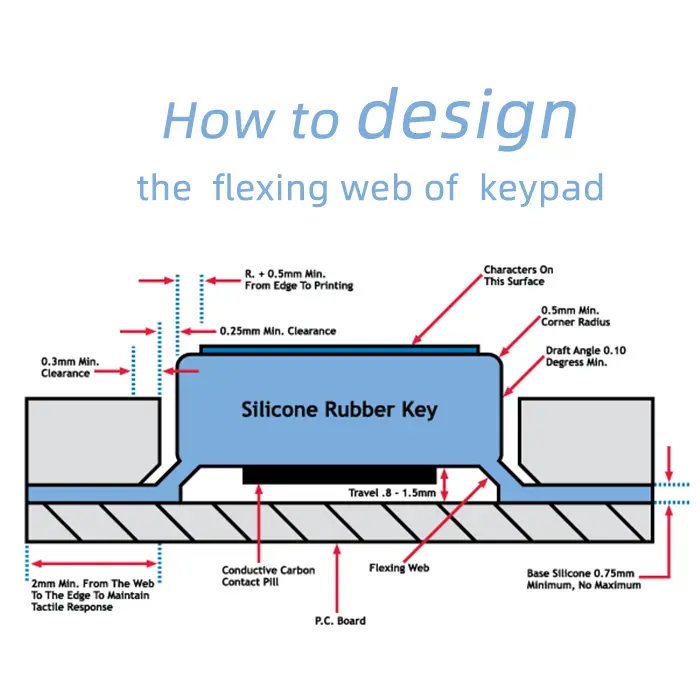
The dimensions below come from a working keypad design guide, and they are a useful starting point because they are the numbers that actually have to appear on a drawing.
Definitions. The flexing web is the thin silicone membrane connecting each key to the base mat. Travel is the distance the key moves before the contact closes, and it is set by the gap between the key underside and the PCB. Clearance is the space between the key wall and the surrounding silicone, and without it the key cannot move freely.
The numbers on the drawing
A practical guide specifies a minimum clearance of 0.25 mm between the key and the surrounding wall, a minimum corner radius of 0.5 mm, and a minimum draft of 0.10 degrees on the key walls so the part releases. Travel sits in the 0.8 mm to 1.5 mm band for a typical key, and the base silicone under the web is usually at least 0.75 mm thick.
Where the web meets the edge
The web should sit at least 2 mm from the edge of the part, so the edge has material to maintain tactile response and to survive handling. Printing should start at least 0.5 mm plus a radius from the edge, or the ink will sit on a curved surface and wear first.
How flexing web design changes the feel
| Change | Effect | When to use it |
|---|---|---|
| Thinner web | Lower force, softer snap | Light-touch consumer keys |
| Thicker web | Higher force, faster return | Gloved industrial panels |
| Steeper cone | Sharper collapse, louder click | Keys that must confirm by sound |
| Wider web span | Longer travel before collapse | Keys with deeper travel targets |
| Asymmetric web | Different force across the key face | Only where the finger always lands in one place |
Clearance is the most common omission
A key drawn tight against the surrounding material has nowhere to move. The result is a key that feels stiff at the edges, squeaks, or tears at the web root after a few thousand presses. The 0.25 mm clearance is not a tolerance; it is a functional gap that has to be modelled deliberately.
Draft and radius are release features
Without draft, the key walls drag against the cavity on ejection and the web is loaded in the wrong direction. Without a radius at the root, the web tears from a sharp corner. Both are cheap on a drawing and expensive in steel.
Why a force target alone is not enough
Two keys can have the same peak force and feel completely different, because the shape of the curve between rest and collapse is what the finger reads. The web profile decides that shape. A design brief that states only a force value lets the moulder choose a geometry that meets the number and misses the feel, which is why the curve belongs in the first article.
Commissioning a web design
Send the travel, the force target and the PCB gap; the profile follows. The silicone keypad manufacturing section covers the tooling, and the custom silicone rubber keypad page shows a web-based construction.
What is a normal web thickness?
It depends on the force target and the key size, which is why the number should be derived rather than copied. The guide values for clearance, radius and travel are the constraints around it.
Why does a key tear at the web?
Usually a sharp root radius or no clearance, so the web is loaded in shear instead of flexing. It is a geometry problem, not a material one.
Design values quoted here are a working starting point from a keypad design guide. Final geometry should be confirmed on a trial cavity with a force-travel measurement.
For a web design review, send the travel and force target through the quotation file checklist.